Passer aux informations produits
1 de 7

Excaliburs Legend

Smart Home Bridge 

Smart Home Bridge 

Prix habituel Dhs. 153.99 AED
Prix habituel Prix promotionnel Dhs. 153.99 AED
Promotion Épuisé
Taxes incluses. Frais d'expédition calculés à l'étape de paiement.
Color
Quantité


HomeKit ZigBee Gateway Hub Smart Home Bridge ZigBee APP Remote Control Works with Apple HomeKit Alexa Google Home Tuya SmartLife


HomeKit ZigBee Gateway Hub Smart Home Bridge ZigBee APP Remote Control Works with Apple HomeKit Alexa Google Home Tuya SmartLife


NOTE!NOTE!NOTE!

Please be sure to read all the textual descriptions in this link before purchasing. All the bad reviews so far come from misunderstandings about the product. All we implore you to read the product description in detail before buying this product, if you do not have time to read the product description in this link, please do not buy. Thanks!


Specification:


Model Number: Homekit ZigBee Gateway Hub 3.0 Gateway Hub


USB power supply: 5V/1A(Power adapter not included)


Working temperature: 10C-55℃


Working humidity: 10%-90% RU


Storage temperature: 10C-55℃


Storage humidity: 10%-90% RH


Network protocol: Zigbee IEEE 802.15.4


Product type: Wired gateway(Needs to be connected to the network through the Ethernet Port.)


Firmware upgrade: OTA support


Size: 78x78x25MM


NOTE!NOTE!NOTE!

Please be sure to read the following description completely before purchasing. Otherwise you are likely to misunderstand the function of the device. Thanks!


1. None of the three options supports Bluetooth.


2.Option 1 (HomeKit Wired Hub)

①Supports both HomeKit and ZigBee protocols.

②This device cannot be directly connected to WiFi(Needs to be connected to the network through the Ethernet Port,The Ethernet port is only used for network connection, not for power supply).

③This is a dual-purpose gateway, which can be used as a ZigBee Hub to connect with TUYA APP, or as a HomeKit Hub to connect with Apple Home APP.

④If you want your Zigbee smart device to connect to Apple Home APP through this Gateway/Hub, you need to make sure your Zigbee smart device supports HomeKit authentication protocol.

⑤When using the TUYA APP, Most Zigbee devices can be added to the gateway. (Non-ZigBee protocol smart devices such as TUYA WiFi smart devices cannot access this ZigBee gateway).

⑥When using the Apple Home APP, you can add HomeKit-certified Zigbee devices to the gateway.

⑦Only HomeKit certified Zigbee smart devices can be added to the Apple Home APP.Therefore, you cannot connect an uncertified TUYA Zigbee smart device to the Apple Home APP through this HomeKit Hub.

⑧When you use Apple Home APP to connect smart devices, you need to make sure that your smart devices are using ZigBee protocol and have been certified by HomeKit, otherwise it will not work, thanks.

⑨This gateway is not compatible with the following device: Tuya Zigbee Smart IR Remote (Tuya ZS06), this device requires the Main Module Versin of the gateway must be higher than 1.31.0, and our gateway Main Module Versin is: 1.3.0.

⑩Please note: The latest version of the HomeKit APP has been updated. Devices such as gateways and bridges will no longer be displayed on the homepage and the homepage of the default room. You will not see the gateway that has been successfully added to the HomeKit APP in the default room.

⑪Non-ZigBee protocol smart devices such as TUYA WiFi smart devices cannot access this ZigBee gateway.


How to find this Gateway in the Apple Home APP ?

Step 1: Click Home Settings. Step 2: Click Home Hubs & Bridges. Step 3: Click Bedroom NEO Gateway (the gateway you want to find). How to add a sub-device, please refer to the steps of adding a sub-device below. After the gateway is successfully added, there is basically no need to operate in the app, unless you want to delete the gateway, so it is a reasonable arrangement to hide it in the default room. When you need to pair with a smart device, you only need to short press the black button on the gateway.


How to restore factory settings:

You can restore factory settings by long pressing the black button on the device, but you cannot judge whether the factory settings are successfully restored by factors such as lights. You need to connect the device to TUYA / Smart Life APP first, and then long press the black button on the device. When you see the gateway disappear from your TUYA / Smart Life APP, you can prove that the factory reset is complete.


How to use TUYA / Smart Life APP and Apple Home APP at the same time?

If you want to use two APPs at the same time, we recommend to connect Apple Home APP first, and then connect TUYA / Smart Life APP, everything will go smoothly. Conversely, when you connect TUYA / Smart Life APP first, then connect Apple Home APP, It will cause the Apple Home APP to fail to connect, and the device cannot be found.


3. Option 2 (ZigBee Wired Hub)

①Does not support HomeKit protocol.

This device cannot be directly connected to WiFi(Needs to be connected to the network through the Ethernet Port,The Ethernet port is only used for network connection, not for power supply).

③You can use TUYA APP or Smart Life APP to connect to this gateway, Apple Home APP is not supported.which can connect most ZigBee smart devices to the above two APPs.

④Non-ZigBee protocol smart devices such as TUYA WiFi smart devices cannot access this ZigBee gateway.


4. Option 3 (ZigBee Wireless Hub)

①Does not support HomeKit protocol.

This device can be directly connected to WiFi(Only supports 2.4Ghz WiFi network, does not support 5Ghz WiFi network).This device does not contain the Ethernet Port(POE).

③You can use TUYA APP or Smart Life APP to connect to this gateway, Apple Home APP is not supported.which can connect most ZigBee smart devices to the above two APPs.

④Non-ZigBee protocol smart devices such as TUYA WiFi smart devices cannot access this ZigBee gateway.


5. Option 4 (HomeKit Door Sensor)


①This is a dual-purpose Door Sensor, which can be used as a ZigBee 3.0 device to connect with TUYA APP, or as a HomeKit Door Sensor to connect with Apple Home APP.


②This device cannot be directly linked to Apple Home APP, this HomeKit device needs to work whih HomeKit hub/gateway.


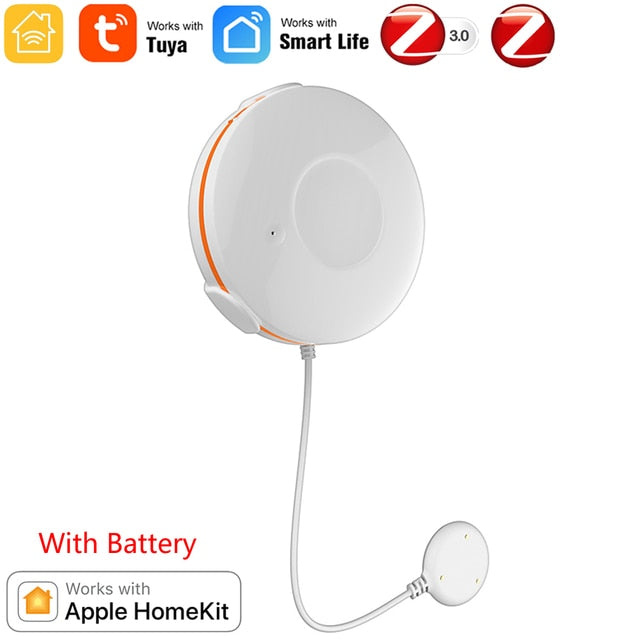
6. Option 5 (HomeKit Water Sensor1)


①This is a dual-purpose Water Leak Sensor, which can be used as a ZigBee 3.0 device to connect with TUYA APP, or as a HomeKit Water Sensor to connect with Apple Home APP.


②This device cannot be directly linked to Apple Home APP, this HomeKit device needs to work whih HomeKit hub/gateway.


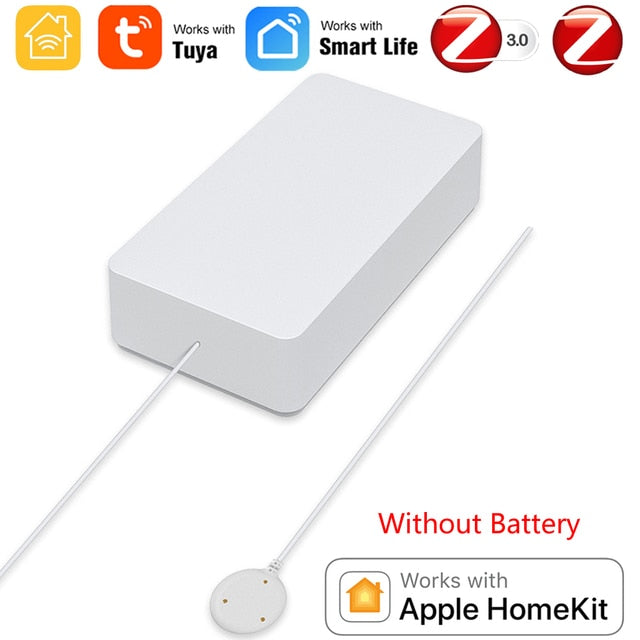
7. Option 6 (HomeKit Water Sensor2)


①This is a dual-purpose Water Leak Sensor, which can be used as a ZigBee 3.0 device to connect with TUYA APP, or as a HomeKit Water Sensor to connect with Apple Home APP.


②This device cannot be directly linked to Apple Home APP, this HomeKit device needs to work whih HomeKit hub/gateway.


8. All options do not include power adapter.


Steps to add HomeKit child device(Homekit Accessories):


Add and manage sub-devices

1.Sub-device additions

(1)Long press the reset button of sub-device to make the sub-device enter the standby state (the indicator lights on).

(2)Short press the gateway reset button to make the gateway enter the sub-device adding state (steady blue, flashing purple).


(3) The device will be automatically added to the gateway. After adding, please find the gateway in the APP through the following path (Step 1: Click Home Settings. Step 2: Click Home Hubs & Bridges. Step 3: Click Bedroom NEO Gateway (the gateway you want to find).)


2. Sub-device settings

Long press the sub-device icon to enter Settings


3. Remove child device

Since there is no option to directly remove the sub-device in the HomeKit gateway in the Apple Home APP, it is necessary to remove the sub-device from the TUYA APP, and the Apple Home APP will remove it synchronously. For details, please refer to the demo video. thanks.


Please note: The content shown in the video is outdated, and the HomeKit APP has been updated. After the update, the added gateway will not be displayed in the default room. How to find the added gateway: Step 1: Click Home Settings. Step 2: Click Home Hubs & Bridges. Step 3: Click Bedroom NEO Gateway (the gateway you want to find).


Packaging Accessories:


Electronic version of the English instruction manual:


Option(HomeKit Door Sensor):


Option(HomeKit Water Sensor1):


Option(HomeKit Water Sensor2):


Afficher tous les détails

Contenu réductible

Merlin 24X7 Support

Contact Merlin Digital Group

Whether you are looking to collaborate, inquire about our innovative products, or explore sustainable real estate opportunities, we are here to help.

Dedicated Business Ventures

General Enquiries

Department

Purpose

Email Address

Admin/General Inquiries

For all corporate and administrative questions.

admin@merlin-digital.com

Product Support

For technical help, troubleshooting, or warranty questions.

support@merlin-digital.com

Accounts/Finance

For billing, invoicing, payments, or supplier relations.

accounts@merlin-digital.com

Human Resources (HR)

For job applications, career opportunities, or employment verification.

hr@merlin-digital.com

Note on Email Domains: Merlin Group uses the primary domain @merlin-digital.com for all corporate functions. Some specialized divisions, such as Merlin GreenSpace/Farms or Craft by Merlin have their divisional domains

1. B2B & Influencer Network

Join our network to collaborate on smart technology, sustainability, or health initiatives.

2. Sustainable Real Estate & Vertical Farming

Inquiries regarding Merlin GreenMagic Homes, Merlin Real Estate developments, or our Vertical Farming ventures focused on sustainable communities and environmental responsibility.

3. Healthcare & ECP Therapy

Learn more about External Counterpulsation (ECP) therapy and book a session at our state-of-the-art center in Dubai (located adjacent to Merlin Farms).

About Merlin Digital

Established in Dubai in 1998, the Merlin Group has over 25 years of dedication to making a smarter world through innovative consumer electronics. Our portfolio today spans smart mobility, multimedia, wearable devices, and AI-powered gadgets. Our new divisions are committed to promoting sustainability and holistic health.

Warranty Included

Share expert tips on how to use this product or pair it with other items.

MerlinDaily.com (“MerlinDaily”) warrants to the original purchaser that products purchased from MerlinDaily.com will be free from defects in material and workmanship for a period of one year from the date of purchase, provided the product is used in accordance with all instructions, warnings and recommendations provided in the product’s packaging and/or on our website.

This warranty does not cover normal wear and tear or damages caused by misuse, abuse, or accidents.

If the product fails to function as warranted during the warranty period, MerlinDaily will, at its sole discretion and option, either repair or replace the product at no charge, provided that the customer has complied with all instructions, warnings, and recommendations provided in the product’s packaging and/or on our website.

In the event that a product is returned during the warranty period, the customer must contact MerlinDaily’s Customer Service Department to obtain a Return Merchandise Authorization (RMA) number prior to returning the product. The customer is responsible for all costs associated with returning the product for repair or replacement, including, but not limited to, shipping costs.

This warranty does not cover any other costs, expenses, or damages associated with the product, including, but not limited to, loss of profits, loss of use, inconvenience, or any other incidental or consequential damages.

MerlinDaily reserves the right to modify this warranty at any time, without notice and without any liability to customers.

This warranty is governed by and construed under the laws of the United States of America and the laws of the State of California, without regard to conflict of laws principles. This warranty is effective as of the date of purchase.

Download the Merlin AI App

The Merlin Global Group has announced the release of their new Merlin AI App, now available on the Google and Apple app stores. Powered by the latest advancements in Artificial Intelligence technology, the Merlin AI App is set to revolutionize the way individuals and businesses view, interact and invest in our technology platform

Android - https://play.google.com/store/apps/details?id=com.merlindaily

Apple - https://apps.apple.com/us/app/id6447600040